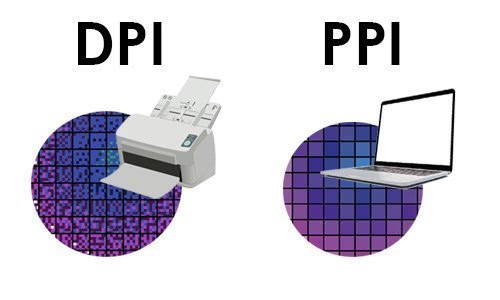
PPI (Pixels Per Inch) and DPI (Dots Per Inch) are terms in the field of digital imaging and printing that we often confuse. While they are related terms, though, the pixels and the DPI refer to different aspects of image resolution and output. Keeping PPI and DPI separate is important for designers, photographers, or anyone who deals with digital imaging or printed matter. Mixing these concepts up can lead to things like poor image quality and pixelation or having a print that you were not expecting.
What is PPI?
PPI (pixels per inch) is the number of pixels in one inch (1″), for a digital image displayed on a screen. The pixels are the smallest detail of an image posted digitally on digital display units like monitors smartphones and tablets.
An image with a resolution of 300 PPI, for instance, has 300 pixels packed into every inch of the image. Higher PPI results in a more detailed and sharper image on screen. Lower values will produce images that appear blurry or pixelated—this appears particularly so upon enlarging the image.
PPI is applicable largely in digital scenarios. The image presented on the screen is actually a field of pixels. The screen itself has a set pixel density too, which can change how images are rendered. New high-resolution displays (for example, called “Retina” or high-DPI displays) have a higher pixel density, which makes images sharper.
What is DPI?
DPI is Dots Per Inch, which is a measurement for printing. It pertains to the number of distinct dots of ink a printer can lay down in one inch of paper. These are not the same as pixels — these are tiny droplets of ink that coalesce to create an image.
300 DPI means that a printer can print 300 dots of ink per inch. Importance of DPI FactorsHigher values in the DPI equate to increased detail and a smoother gradient in an image once printed. Professional printers could run 600 DPI, 1200 DPI, or above based on the detail level.
DPI, on the other hand, refers to the physical output of digital data onto a medium such as paper, unlike PPI. It is used to determine print quality, not digital display quality.
Difference Between PPI and DPI
PPI and DPI are similar but have different functions. Here are the main differences:
Medium of Use
Digital displays need PPI, while print requires DPI. PPI is your main interest if you are focusing on a website or digital artwork. DPI becomes more relevant if you are setting up a file for print.
Measurement Type
While PPI pertains to digital images specifically, DPI is the number of ink dots a printer uses to create an image.
Image vs. Output
PPI is a measurement of the image resolution. DPI determines how that image is translated out by a printer physically.
Interdependence
PPI and DPI are related, though they are not the same thing. The PPI of the image will dictate how this is converted into dots when printing an image. So as a rule of thumb, an image with 300 PPI that gets printed at 300 DPI will yield print prints because the number type/image resolution meets the printer quality.
Read Also : SEO in the Age of AI: Impact of AI on SEO
Why the Confusion?
The historical usage of the term and software terminology have led to much confusion between PPI and DPI. DPI has been used as a catch-all term for resolution by numerous programs and users whilst discussing digital images. This has increasingly blurred the distinction.
When you prepare images for the print, in fact software asks you to enter a “resolution” value and sometimes it is written DPI even though actually it means PPI. This overlap has caused the confusion.
Practical Applications
Knowing when to apply PPI and DPI is essential in practical applications:
Digital Design:
Image at an Event If you are creating images going onto websites social media or apps, pixel dimensions more than DPI should take priority. For instance, a 1920×1080 pixel image will look fine on most screens regardless of its PPI setting.
Print Design:
A standard for printing would be 300 PPI for high-quality images. This makes sure that when the image will be printed on an equivalent dpi, it looks sharp and precise. Lower resolution images, like 72 PPI, might look good on screen but will be blurry when printed.
Photography:
All photographers edit in high resolution for versatility. A high PPI image is capable of being resized or printed with larger dimensions without degradation.
Scaling and Resizing:
If you size an image up but don’t increase the number of pixels, then its PPI drops leading to lower quality. It means when we reduce the size of an image, PPI and crispness also come up.
PPI vs DPI in Printing: What’s the Relationship?
The PPI vs. DPI relationship becomes significant during the preparation of an image for print. Each pixel can be made up of several dots in the case of color printing. A printer’s DPI is usually higher than the image’s PPI.
So a printer could combine multiple ink dots to present a single pixel, blending to output the final image. That is why a 300 PPI image will still look great on a 1200 DPI printer.
Common Misconceptions
A common myth is that by raising an image’s DPI setting in a software program, I’ll be able to raise its quality. Essentially, increasing the DPI value alone does not increase the detail in the image. It only alters how the image gets interpreted for printing.
Someone else is that screen actually does have to be set to a 72 PPI. Though this was historically a standard placeholder, pixel density differs considerably from display to display in 2023 and so the number is much less relevant.
Conclusion
According to Picktech Innovations Both PPI and DPI are important in imaging, although they operate in different realms. PPI relates to how a digital image is displayed on screens, whereas DPI pertains to the density of printed output.
Knowing the difference helps guarantee that images appear crisp and polished when viewed, whether in a digital medium or on printed surfaces. Knowing the correct resolution to use for the medium, and so avoiding common mistakes, will help ensure that your work is the best it can be.